So I haven't updated my SailBusDublin app in a little while because my dev tools were broken. I was getting an error:
Error connecting to "MerSDK" virtual machine: Failed to start virtual machine "MerSDK"
At first I thought I haven't done anything other than update the tools and was a little annoyed at jolla for breaking them but then I came to my senses, people were clearly publishing apps on the store so it was probably an issue on my end.
I figured it was something easily fixable so did a little googling and couldn't find anything.This is not as weird as you might think given the size of the developer community so I decided I'd leave it a little while and someone else would run into the problem and fix it (the it's a side project and I'm being lazy approach) but alas while some people ran into it, no one seemed to fix it. So I decided to put the effort in and debug the issue.
It's fairly clear from that error that it's an issue with the VM so I opened virtual box rather than bother with QtCreator again and tried to start the VM and got an error about intel's VT-x which was weird because I didn't remember making any changes to my laptop in regards to virtualization. Anyway found some redhat docs on the issue:
https://access.redhat.com/documentation/en-US/Red_Hat_Enterprise_Linux/6/html/Virtualization_Administration_Guide/sect-Virtualization-Troubleshooting-Enabling_Intel_VT_and_AMD_V_virtualization_hardware_extensions_in_BIOS.html
and went into the BIOS and turned it back on and voila the "MerSDK" VM started and I was back up and running.
I think I turned it off at some point because of a security issue with VT-x but the only issue I can find of the subject can't be exploited on my laptop because it's 64-bit running a 64-bit host. That said if your running a 32-bit host be careful of the VM's you use if you re-enable VT-x.
Saturday, 3 January 2015


Saturday, 5 April 2014
Ubuntu One shutting down and what that means for the KDE plugin
 I have recently learned that Ubuntu One will be shutting down on June first, with data accessible for another 2 months after that. See Canonical's Post for more details ...
This is a little sad for me as I have enjoyed using the service and trusted Canonical with my data, a lot more than a great many other companies. So much so, that I wrote a plugin which allowed KDE users to access Ubuntu One through Dolphin. I intend to put an updated version of the plugin on the opendesktop.org which notifies users of this decision and I will pull the plugin on the first of June when the service goes down. The code will remain avaible under the MIT license on github if anyone wants to use it for their next cloud storage solution.
I want to thank all my users for being so nice when reporting feedback, be they bugs or compliments they were always polite and informed. I would also like to thank Canonical for a wonderfully reliable service and thank them for opensourcing the back-end now that they are shutting down said service.
I wish everyone the best of luck if finding a new cloud storage solution, I think I will be using this opportunity to switch to a service with client side encryption by default. I whole heartedly recommend others do the same.
Sunday, 23 March 2014
SailBus Dublin
Just a quick post to announce I've released an app for the new Jolla smart-phone. "SailBus Dublin" is a bus tracking app for Dublin city based off the National Transport Authority's new Real Time Information System(RTPI) API.
 It is free and open source, the code is available on github and bitbucket. I'll probably write a post in the future about how it all works but for the moment I'll just list a few of the features and say a big thank you to the National Transport Authority and Dublinked for giving me API access.
Features:
Features:
- Realtime information about bus arriving to stops
- Route information i.e. stops on a route
- Stop Location
Saturday, 22 February 2014
Making sites accessible one step at a time
There is a section of society that many of us as developers don't consider when making our applications, those who have a disability. We often represent information with colours or images not thinking of how it may affect a visually impaired user using a screen reader or unknowingly break the tab flow to make keyboard use of an application impossible.
I have the privilege of working for a company which only produces accessible applications but I would like this ethic to rub off on some of my personal projects.
In the next series of posts, I'm going to make my blog accessible and explain how I did it and what tools I used to do it hopefully giving insights for others into a how to make their applications accessible. In order to do this I will be making this site WCAG 2.0 compliant.
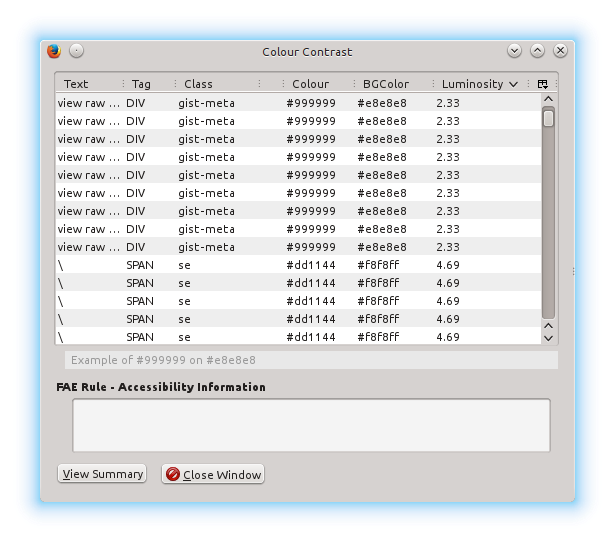 The first step in this process is to tweak the colour scheme of the site in order to be WCAG compliant. Which is to say, having a greater than 4.5 contrast between all text and it's respect background and make sure the link colour has a greater than 3.0 contrast with the surrounding text.
In order to find the issues with the site I used a firefox plugin, luckily once the issues were found it wasn't much work to fix them and the blog's theme by default was mostly accessible as only two pieces of text had to be changed to a darker colour. The main issue was the github gist iframe I use to display code snippets, unfortunately this had several issues with the area surrounding the code surface. In order to fix these issues, I hid the bottom bar and added CSS to darken the line numbers on the side. I'll have to add an attribution to github somewhere else in the site.
There you have it a small change which will help a certain demographic of visually impaired users to use my site more effectively. In my next post I'll be discussing keyboard usability.
I have the privilege of working for a company which only produces accessible applications but I would like this ethic to rub off on some of my personal projects.
In the next series of posts, I'm going to make my blog accessible and explain how I did it and what tools I used to do it hopefully giving insights for others into a how to make their applications accessible. In order to do this I will be making this site WCAG 2.0 compliant.
The first step in this process is to tweak the colour scheme of the site in order to be WCAG compliant. Which is to say, having a greater than 4.5 contrast between all text and it's respect background and make sure the link colour has a greater than 3.0 contrast with the surrounding text.In order to find the issues with the site I used a firefox plugin, luckily once the issues were found it wasn't much work to fix them and the blog's theme by default was mostly accessible as only two pieces of text had to be changed to a darker colour. The main issue was the github gist iframe I use to display code snippets, unfortunately this had several issues with the area surrounding the code surface. In order to fix these issues, I hid the bottom bar and added CSS to darken the line numbers on the side. I'll have to add an attribution to github somewhere else in the site.
There you have it a small change which will help a certain demographic of visually impaired users to use my site more effectively. In my next post I'll be discussing keyboard usability.
Saturday, 11 January 2014
Jolla - Review
So two days before Christmas my long awaited Jolla, a new smart phone created by the Finnish startup Jolla, arrived. First impressions were great, it was pretty, the battery lasted me more than a day and the android app compatibility seemed to work really well. Unfortunately due to the hectic Christmas season I didn't get to play with it very much but it did perform flawlessly in it's primary role as a phone.
 After new years and things had quieted down a bit in life, I started to play about with it more:
Music Issue:
I recommend you check out tracker-control on the command line it seemed to work for some people over at together.jolla.com. It only worked partially for me so I wrote a little bash to generate play-lists for artists which the indexer didn't pick properly.
Too fully understand this have a look at the PLS format it's not a very interesting read but if you ever want to create a PLS file without a media application it may be of some use.
Sound issue for Android Apps:
You need to become root using devel-su and then run this :
to restart the alien dalvik VM.
Source
MTP File Transfer Issues:
After new years and things had quieted down a bit in life, I started to play about with it more:- Setup email
- Install Humble Bundle for Android games
- Add more than just an album or two to the music library
- Use the Maps app
- Write software for the device (because this blog isn't called software on the side for nothing)
- etc ...
- Some music didn't get indexed properly and wouldn't show up in the media app
- Sound stopped working for android apps
- Camera didn't work for android apps
- MTP is a bit flakey(not sure if this is a Jolla problem or and issue with my Kubuntu install)
Music Issue:
I recommend you check out tracker-control on the command line it seemed to work for some people over at together.jolla.com. It only worked partially for me so I wrote a little bash to generate play-lists for artists which the indexer didn't pick properly.
Too fully understand this have a look at the PLS format it's not a very interesting read but if you ever want to create a PLS file without a media application it may be of some use.
Sound issue for Android Apps:
You need to become root using devel-su and then run this :
to restart the alien dalvik VM.
Source
MTP File Transfer Issues:
- SSH
- Rsync
- Ubuntu One for Android
- etc..
Monday, 22 July 2013
Ubuntu on the Edge of Success

My eyes have been glued to Canonical's crowd funding campaign, to create Ubuntu Edge. A top of the line limited edition smart phone packed with technologies everyone is too scared to ship. They are asking for a lot, 32 million dollars, in order to produce 40,000 incredibly awesome Ubuntu Touch devices. The specs of the devices are stunning:
- Fastest multi-core CPU, 4GB RAM, 128GB storage
- 4.5in 1,280 x 720 HD sapphire crystal display
- 8mp low-light rear camera, 2mp front camera
- Dual-LTE, dual-band 802.11n Wi-Fi, Bluetooth 4, NFC
- GPS, accelerometer, gyro, proximity sensor, compass, barometer
- Stereo speakers with HD audio, dual-mic recording, Active Noise Cancellation
- MHL connector, 3.5mm jack
- Silicon-anode Li-Ion battery
- 64 x 9 x 124mm
What's truly insane about this is that they not only have to break nearly every crowd funding record ever set in this attempt but they are on course to do so and then some. When I returned from work at 7:40 they were at about 770,000 dollars as I write this post at 22:10 they are at 1,430,000 dollars. That means in about four and a half hours they have raised 660,000 dollars at a rate of 146,666 dollars every hour. At that rate they will reach their goal in a little over a week.
That said I think some of this has to do with the first day offer of a $600 device instead of paying $800 dollars but it is never the less promising and if they hit their goal it will send shock-waves through both the software and mobile industries.
Saturday, 1 June 2013
Phone Gap's Build Service is Awesome
If you haven't heard of Phone Gap before it's a framework for turning HTML5 applications into mobile applications. I've used it before by downloading the SDK and building apps for both Android and iOS using mainly javascript with a small bit of native code. It's a pretty awesome piece of tech although it can tend to be a bit slow.
Today was the first time I used Adobe's Phone Gap Build Service and I have to say I was extremely impressed. Firstly it's free for opensource apps, it took maybe 2 minutes to setup, integrate with Github and suddenly I had an application targeting :

Today was the first time I used Adobe's Phone Gap Build Service and I have to say I was extremely impressed. Firstly it's free for opensource apps, it took maybe 2 minutes to setup, integrate with Github and suddenly I had an application targeting :
- Android
- Windows Phone
- Symbian
- Blackberry
- webOS
Subscribe to:
Posts (Atom)